
Docker Swarm to AWS Migration Case Study: How Kaopiz Scaled an EdTech Platform Without Changing a Line of Code
Most cloud migration conversations start with the application. This one didn’t. When our Japan EdTech client came to us, the application was working — the infrastructure around it wasn’t keeping up. A growing user base, increasing traffic from tablet-based learning sessions, and a Docker Swarm setup on Equinix that required too much manual intervention to stay stable.
The constraint was clear: migrate to AWS, improve scalability and operational efficiency, and don’t touch the application. That last requirement is more common than people think in EdTech — live learning platforms can’t absorb the risk of application-level changes mid-migration.
This case study documents how we executed that migration, the architecture decisions, the sequencing, and what changed after we moved. All project details and outcomes in this case study are accurate. The client’s name is kept confidential at their request.
If you’re running a containerized EdTech platform that’s outgrowing its current infrastructure, this is what a structured migration looks like in practice.
Key Takeaways
- Client: Japan EdTech client, operator of a network of private tutoring schools and AI-based tablet learning platforms, serving 2,000+ users
- Challenge: Existing Docker Swarm cluster on Equinix could not scale to meet growing traffic; manual operations creating bottlenecks
- Scope: Full migration from on-premises Docker Swarm to AWS, without modifying the application itself
- Stack: PHP Laravel, VueJS, Yii2, C#/Unity, migrated to AWS with auto-scaling, CloudWatch monitoring, and cloud-native resource management
- Results: 40% reduction in manual operations, 99.9% uptime, 25% infrastructure cost reduction, 60% faster deployment cycles
The Client: Our Japan EdTech Client and the Platform
Our client is a Japan-based comprehensive education company operating in Japan, best known for a private tutoring school network. Beyond classroom instruction, the company operates a portfolio of EdTech services: AI-driven tablet learning, online private tutoring, educational content development, and school management tools.
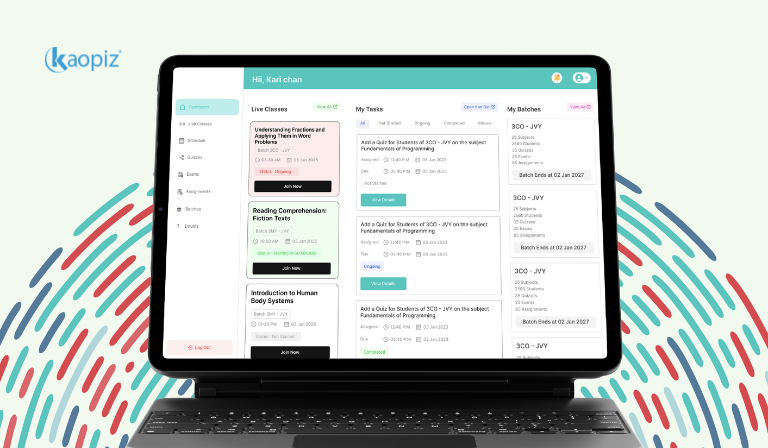
The platform is our client’s tablet-based learning product, used by students across their school network for self-paced study in Japanese, English, and Mathematics. The platform manages subject selection, class scheduling, learning progress tracking, student accounts, device settings, and log management across multiple school locations.
With 2,000+ active users and ongoing expansion, the platform was growing beyond what the existing on-premises infrastructure was designed to handle.
The Problem: Why Docker Swarm on Equinix Was No Longer Enough
Running a containerized application on Docker Swarm is a reasonable starting point. For many EdTech platforms, it works well in the early stages, relatively simple to operate, predictable behavior, low overhead. The problems emerge at scale.
Scalability Was Manual and Slow
The platform was running on a Docker Swarm cluster on Equinix. As student usage increased, particularly during peak learning sessions and school term periods, the infrastructure had no mechanism to automatically scale. Capacity adjustments required manual intervention, which introduced lag between demand spikes and the infrastructure response. In a live learning environment, that lag is felt by students and teachers in real time.
Operational Overhead Was Compounding
Manual scaling isn’t just slow, it’s expensive in terms of engineering time. The client’s operations team was managing resource allocation, monitoring, and incident response largely by hand. As the platform grew, this overhead was growing proportionally, consuming internal capacity that should have been directed toward product improvement.
Monitoring Lacked Real-Time Visibility
The existing setup had limited real-time monitoring capability. Detecting performance degradation before it affected users required manual checks rather than automated alerts. For a platform serving students mid-session, the gap between a developing problem and a detected one was too wide.
The Constraint: No Application Changes
Here’s what made this migration more complex than a standard lift-and-shift: our client required that the application itself not be modified. No refactoring, no dependency updates, no changes to the codebase. The migration had to rebuild the infrastructure layer around an unchanged application and establish cloud connectivity without disrupting existing operational processes.
The challenge wasn’t moving to AWS. Most teams can do that. The challenge was doing it without touching the application, maintaining continuity for 2,000 active users, and building an infrastructure that wouldn’t need the same manual intervention the old one did.
Our Solutions: How We Executed the Docker Swarm to AWS Migration
Kaopiz structured the EdTech cloud migration in three phases: rebuild, optimize, and connect. Each phase had a clear deliverable and a defined success criterion before we moved to the next.
Phase 1: Rebuild the Docker Swarm Cluster on AWS
The first step was not to abandon the Docker Swarm architecture; it was to rebuild it on AWS infrastructure. This preserved the operational model the client team was familiar with while moving the underlying compute to a platform that could support cloud-native capabilities.
We provisioned the cluster on AWS EC2 instances, replicating the existing Swarm topology in the cloud environment. Running parallel environments during this phase allowed us to validate behavior before cutting over, reducing the risk of service disruption for active users.
Phase 2: Introduce Auto-Scaling and Cloud-Native Resource Management
With the cluster running on AWS, we introduced the capabilities that made the migration worthwhile. Auto-scaling was configured to respond to traffic patterns automatically, adding capacity during peak learning sessions and scaling down during low-traffic periods. This eliminated the manual resource management that had been consuming the operations team’s time.
AWS CloudWatch was integrated for real-time monitoring, CPU utilization, memory usage, request latency, and error rates across all services. Alerting thresholds were configured to surface developing problems before they reached users, replacing the previous manual monitoring approach.
Phase 3: Establish Cloud Connectivity Without Application Changes
This was the most technically constrained phase. The application, PHP Laravel, VueJS, Yii2, and C#/Unity components, needed to connect to AWS services without any code modifications. We handled this through infrastructure-level configuration: environment variables, network routing, and service endpoint mapping that the application consumed without any awareness of the underlying change.
Storage connections, database endpoints, and service-to-service communication were all routed through the AWS environment via configuration rather than code. The application saw the same interface it always had; the infrastructure behind that interface was now cloud-native.
What the Platform Includes and What We Moved
Understanding the scope of what was migrated matters for anyone evaluating a similar engagement. The platform is not a simple web application; it’s a multi-function platform with significant data management complexity.
| System Component | Function | Migration Consideration |
|---|---|---|
| Subject management | Japanese, English, Mathematics content and question banks | Database connections re-routed via AWS RDS configuration |
| Learning mode engine | Normal learning, tests, review, progress tracking | Stateless service — migrated cleanly to containerized AWS environment |
| Student & account management | Student profiles, administrator accounts, school/class/group hierarchy | Data integrity validation required before and after cutover |
| Log management | Learning logs, login history, device logs | CloudWatch integration for log aggregation and retention |
| Notification system | Class and learning notifications | Queue service connections updated via environment config |
| Device & app settings | Tablet configuration management | API endpoints updated at infrastructure level, no app changes |
| School information management | Multi-location school, class, and group data | Cross-location data sync validated during parallel-run phase |
Results After Migration
Here’s what changed after the cloud infrastructure migration completed.
Auto-Scaling Eliminated Manual Capacity Management
The most immediate operational change was the removal of manual scaling from the team’s workload. Traffic spikes, predictable during school term periods and less predictable during exam seasons, are now handled automatically. AWS auto-scaling responds to demand in real time, without requiring human intervention.
The platform now handles up to 3x traffic spikes without performance degradation. Infrastructure provisioning time dropped from days to minutes.
Operational Overhead Significantly Reduced
Manual operations that previously required dedicated engineering time, resource provisioning, capacity monitoring, scaling decisions are now automated. The client’s operations team shifted from reactive infrastructure management to reviewing dashboards and acting on automated alerts.
Manual operations and system administration time dropped by 40%. Deployment cycles are 60% faster, changes that previously required days of provisioning now take minutes.
Real-Time Monitoring Replaced Manual Checks
CloudWatch dashboards now surface performance metrics across all platform components in real time. Alert thresholds catch developing issues, latency spikes, error rate increases, and memory pressure before they affect student sessions. The gap between a developing problem and a detected one, previously measured in hours, is now measured in minutes.
Infrastructure Costs Optimized Through Efficient AWS Resource Use
Auto-scaling isn’t just a reliability feature, it’s a cost control mechanism. By scaling compute resources down during low-traffic periods (overnight, weekends, school holidays), the platform now pays for capacity proportional to actual demand rather than provisioning peak capacity at all times.
Infrastructure operating costs reduced by 25% through optimized AWS resource usage, and auto-scaling down during low-traffic periods means paying for capacity proportional to actual demand.
System Availability Improved, Downtime Minimized
Multi-AZ deployment on AWS provides fault tolerance that the single-cluster Equinix setup couldn’t match. Individual instance failures no longer affect service availability; the auto-scaling group replaces unhealthy instances automatically, maintaining platform continuity for active learning sessions.
System uptime improved to 99.9%, up from approximately 95–97% on the previous on-premise setup. Downtime reduced by ~70%. Page and app load times improved by ~30% due to distributed cloud resources.
“Thank you as always. I look forward to working with you again in the future.”
— Operations Team, Japan EdTech Client
Why Zero Application Changes Matter More Than It Sounds
When a platform is serving live users, students in active learning sessions, teachers managing classes, the risk tolerance for application changes is near zero. Every code change introduces the possibility of a regression. In an education context, a regression during a learning session or an exam period isn’t just a technical incident; it’s a direct disruption to learning outcomes.
Executing a full infrastructure migration without touching the application requires a different approach than a standard cloud migration. It requires infrastructure-level abstraction, making the cloud environment look, to the application, like the environment it was already running in. That’s a harder problem to solve, but it’s the right one to solve when user continuity is non-negotiable.
When Does a Docker Swarm to AWS Migration Make Sense?
Not every Docker Swarm deployment needs to move to AWS. The decision makes sense when several conditions are true simultaneously.
- Traffic is growing and unpredictable. If your peak load is more than 2–3x your baseline and you’re provisioning for peak, you’re paying for idle capacity most of the time. Auto-scaling on AWS solves this.
- Manual operations are consuming engineering time. If your team is spending meaningful time on capacity management and monitoring that could be automated, the operational cost of staying on-premises is real and compounding.
- Your monitoring is reactive rather than proactive. If you’re finding out about performance problems from user reports rather than alerts, you need real-time observability. CloudWatch provides this; most on-premises setups don’t.
- You need multi-region or multi-AZ availability. Single-cluster Equinix or on-premises deployments typically can’t match the fault tolerance of a properly configured AWS deployment without significant infrastructure investment.
If fewer than two of these are true, the migration cost may not be justified. If three or four are true, the question isn’t whether to migrate, it’s how to do it without disrupting your users. Not sure where your platform stands? Kaopiz can help you assess your infrastructure and map out a migration path that keeps your users uninterrupted.
Conclusion
The platform migration demonstrates what a well-sequenced Docker Swarm to AWS migration looks like when the constraints are real: a live platform, active users, a codebase that can’t change, and an operations team that needs to come out the other side with less work, not more.
The architecture decisions, rebuilding the Swarm cluster on AWS first, introducing auto-scaling second, and handling cloud connectivity through infrastructure configuration, gave us a migration path that maintained continuity throughout. The result is an infrastructure that scales with demand, monitors itself, and costs less to operate than the setup it replaced.
If your platform is facing similar constraints, the migration approach is repeatable. The specifics depend on your stack and your scale, but the sequencing works.
FAQs
- How long does a Docker Swarm to AWS migration take?
- It depends on system complexity and constraints. For multi-service platforms with strict migration requirements, expect 2–4 months from scoping to cutover. Simpler migrations move faster; complex data dependencies or compliance requirements take longer.
- Can you migrate to AWS without changing the application code?
- Yes, and this is more common than people expect. Infrastructure-level configuration (environment variables, service endpoint mapping, network routing) handles most of the connectivity changes. The application sees the same interface it always did. The constraint is that this approach requires more careful infrastructure design upfront; it’s not a standard lift-and-shift.
- Why migrate from Docker Swarm to AWS rather than Kubernetes?
- Kubernetes offers more flexibility but significantly more operational complexity. For teams already on Docker Swarm, rebuilding on AWS is the lower-risk path to scaling and reliability — no architectural overhaul required. We evaluate both options during scoping based on your team’s capacity and long-term roadmap.
- What AWS services are typically used in this type of migration?
- For a Docker Swarm to AWS migration, the core services are typically EC2 (compute), Auto Scaling Groups (capacity management), CloudWatch (monitoring and alerting), ELB (load balancing), RDS (managed database), and ECR (container registry). The specific combination depends on the platform’s existing architecture and what needs to change.
- How do you handle data migration during the cutover?
- Data migration is typically the highest-risk part of any infrastructure migration. Our approach involves running parallel environments during a validation period, performing incremental data sync before cutover, and executing the final cutover during a low-traffic window with a tested rollback path in place. For the platform migration, data integrity was validated at each phase before proceeding.
Author

Lucie Tran
Head of Growth of Kaopiz Global
Table of Contents
Don’t miss what’s next!
Thank you! Your form has been submitted successfully.